제품 정보로 건너뛰기
1 1
6-MONTH VALIDITY REFUND GUARANTEE

5% 캐시백

앱 스토어 및 아이튠즈 포르투갈

앱 스토어 및 아이튠즈 포르투갈

정상 가격 $8.46 USD
판매 가격 $8.46 USD 정상 가격

Buy now, activate within 6 months

Enjoy the flexibility to purchase today and activate your eSIM when you land.

Refund Guarantee

아직 어떻게 작동하는지 확실하지 않으신가요? 걱정 마세요—BitJoy를 위험 부담 없이 5일 환불 보장과 함께 사용해 보세요.

특징

  • Brand: App Store & iTunes
  • Country: Portugal
  • Denomination Type: FIXED

설명

Apple giftcard 사용 방법 사용 가능한 곳 Apple Gift Card는 다음에서 구매 시 사용할 수 있습니다:
• Apple 매장(직접 방문 또는 apple.com 온라인).
• Apple Store 앱.
• App Store, iTunes, Apple Music, Apple TV, Apple News, Apple Books, Apple Arcade, iCloud 및 기타 Apple 서비스.
• iPhone, iPad, AirPods, MacBook, 액세서리 등 Apple 제품. giftcard 사용 방법
1. 온라인 구매:
• apple.com/redeem에 접속하여 giftcard를 Apple 계정 잔액에 추가하세요.
2. 매장 내 구매:
• 이 이메일과 giftcard 세부 정보를 지참하여 모든 Apple Store 매장에 방문하세요. 중요 정보
• 반품 및 환불 불가: Apple Gift Cards는 환불 불가하며 교환할 수 없습니다.
• 사기 경고: giftcard 코드를 절대 공유하지 마세요.
• 제한 사항:
• Apple 관련 거래 중 미국 내 거래에만 유효합니다.
• 법률에 의해 요구되는 경우를 제외하고 Apple 리셀러나 현금으로 교환할 수 없습니다.
• 재판매, 환불 또는 교환이 불가합니다.
• Apple은 카드의 무단 사용에 대해 책임지지 않습니다. 약관 및 지원
• 전체 약관이 적용됩니다.
• 도움이 필요하시면 support.apple.com/giftcard를 방문하거나 1-800-275-로 전화하세요.
2273.

Apple 제품과 서비스를 즐기세요!

관련: PT, 리스본, 포르투, 빌라 노바 데 가이아, 아마다라, 브라가

Payment & Security
American Express Apple Pay Diners Club Discover Google Pay JCB Mastercard PayPal Visa
Bitcoin
USDC
Ethereum

귀하의 결제 정보는 안전하게 처리됩니다. 저희는 신용카드 정보를 저장하지 않으며 신용카드 정보에 접근하지 않습니다.

전체 세부정보 보기
  • 목적지를 선택하고, 데이터 요금제를 선택한 후 결제를 완료하세요. 즉시 이메일로 QR 코드를 받아 스캔하고, 물리적 SIM 없이 간편하게 eSIM을 활성화하세요!

    eSIM 탐색하기
  • 다양한 행사와 목적지에 맞는 디지털 기프트 카드를 선택하세요.

    기프트 카드 탐색하기
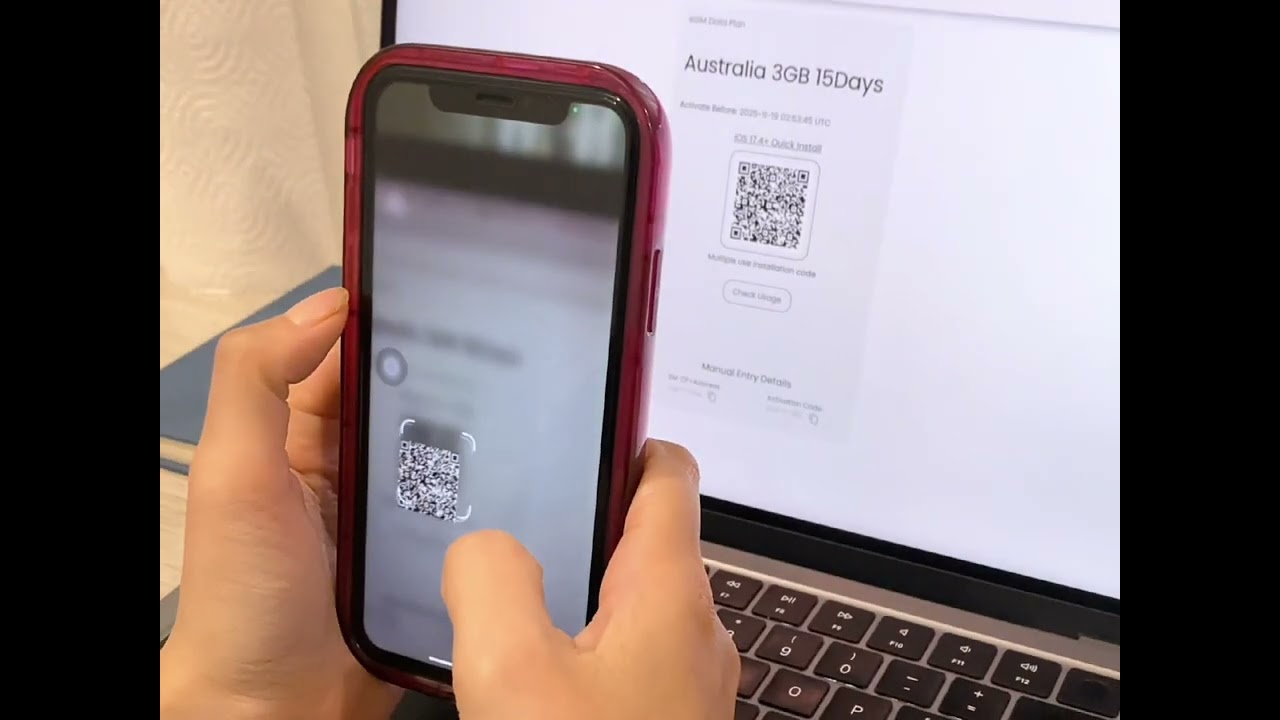
eSIM How It Works Video
Click to play

How Does BitJoy's eSIM Work?

Getting connected with BitJoy is fast, easy, and hassle-free! Just follow these simple steps!
Device compatibility illustration
STEP 1

Check device compatibility

Make sure your phone supports eSIM. Most iPhones (XS or newer) and many Android devices do. Your phone must also be carrier-unlocked.
Purchase plan illustration
STEP 2

Choose and Purchase Your Plan

Select your eSIM plan and complete payment. You'll receive an email with your QR code and activation details instantly.
Install eSIM illustration
STEP 3

Install Your eSIM

QR Code (Recommended)

1
Open Settings → Cellular / Mobile Data → Add eSIM
2
Scan the QR code from your BitJoy email
3
Follow the setup prompts to complete installation

Manual Setup

1
Open Settings → Cellular / Mobile Data → Add eSIM
2
Choose "Enter Details Manually"
3
Enter the SM-DP+ address and activation code from your BitJoy email
Activate eSIM illustration
STEP 4

Activate Your eSIM

Your eSIM connects automatically. Before browsing, be sure to:
Check
Turn on Data Roaming
Check
Set eSIM as your Primary Data Line
Check
Keep SIM active for calls/SMS
Need help illustration
STEP 5

Need Help?

Chat
Live Chat: 24/7 support available
Help
Help Center: Step-by-step guides & troubleshooting
Video
Video Tutorials: Watch setup demos for your device

What our customers are saying

4.4/5.0
  • Video testimonial by Alex
  • 5 stars
    It activated quickly. I connected without any issues after receiving the QR code in a matter of minutes. The ability to pay with cryptocurrencies was also appreciated; the entire process went well. I had no trouble staying connected during my journey because of it. For hassle-free internet access, BitJoy is a great option if you're planning a trip soon!
    Carl Walker
    Location
    United States
    Closing quote
  • 5 stars
    The activation process is not complicated, and it was done quickly by following the steps. The payment method is also flexible. I tried credit card and cryptocurrency payment, and both were completed smoothly, and the payment was immediate. When I arrived at the local area, I scanned the code to connect to the Internet, which is very convenient and very suitable for travel.
    Larry Johnson
    Location
    United States
    Closing quote
  • 4 stars
    I'm giving 4 stars because the installation guide didn't mention that I had to set up the APN manually, and support also didn't immediately suggest it. I had to do some troubleshooting myself. Other than that, so far so good. P.S. I used it in Turkey and the APN is 'isp.'
    Dmitry Ungurean
    Location
    Netherlands
    Closing quote
  • 4 stars
    Activation is simple, and payment supports multiple methods, including cryptocurrency, and the operation is very smooth.
    Albert Hill
    Location
    United States
    Closing quote
  • 5 stars
    The experience is good, the whole process is smooth, and it is very user-friendly.
    Tony Robertson
    Location
    United States
    Closing quote
  • 5 stars
    I purchased data from BitJoy for my father. Data worked as promised by the team. My father didn't face any problem at Toronto airport.
    Rahul Sharma
    Location
    United Arab Emirates
    Closing quote