製品情報へスキップ
1 1
6-MONTH VALIDITY REFUND GUARANTEE

5% キャッシュバック

コルテ・イングレス ES

コルテ・イングレス ES

通常価格 $15.80 USD
セール価格 $15.80 USD 通常価格

Buy now, activate within 6 months

Enjoy the flexibility to purchase today and activate your eSIM when you land.

Refund Guarantee

まだ仕組みがよくわからないですか?ご安心ください—BitJoyをリスクなしでお試しいただけます。5日間返金保証付きです。

価値

特徴

  • ブランド: Corte Inglés
  • Country: スペイン
  • 額面タイプ: FIXED

説明

説明: デジタルコードは13桁の数字コードと6桁のPINコードで構成されており、www.elcorteingles.esおよびwww.elcorteingles.comでの購入に使用できます。また、El Corte Inglésのアプリを通じて実店舗での支払いにも利用可能です。 *(マットレス、家具(オーダーメイドまたはカスタム)、エアコン、花、ギフト、スーパーマーケットを除く。) 交換手順: コードと関連するPINを含むコードがメールで届きます。 www.elcorteingles.esでオンライン購入時、またはスペイン国外の場合はwww.elcorteingles.comで交換可能です。 マットレス、家具(オーダーメイドやカスタマイズ品)、エアコン、花、ギフト、スーパーマーケットを除き、オンラインで利用可能なすべての商品に有効です。 ショッピングセンターでデジタルコードを使って支払う場合は、以下の手順に従ってください: El Corte Inglésのアプリをダウンロードしてください。 メインの支払い方法を関連付けてください。 コード全体を「ギフトカード」としてデジタルウォレットに追加してください。 QRコードを生成し支払いを行うには、両方の支払い方法(メインカードとギフトカード)を選択してください。 購入ごとに最大10コードまで利用可能です。 コードは現金と交換できず、有効期限もありません。 購入金額がコードの残高を超える場合、差額は「支払い方法」で指定された任意の支払い方法で支払われます。 購入金額がコードの価値より低い場合、残高は次回の購入に利用できます。 差額は現金で返金されず、El Corte Inglésのバーチャルコード購入後の返品は受け付けられません。 利用規約: コードは現金と交換できません。 コードの有効期限はありません。 購入金額が利用可能な残高を超える場合、差額は指定された支払い方法で支払われます。 購入金額がコードの価値より低い場合、残高は今後の購入に利用できます。 差額は現金で返金されません。 El Corte Inglésのバーチャルコード購入後の返品は受け付けられません。

関連: ES, マドリード, バルセロナ, バレンシア, セビリア, サラゴサ

Payment & Security
American Express Apple Pay Diners Club Discover Google Pay JCB Mastercard PayPal Visa
Bitcoin
USDC
Ethereum

お支払い情報は安全に処理されます。クレジットカードの詳細は保存せず、クレジットカード情報にアクセスすることもありません。

詳細を表示
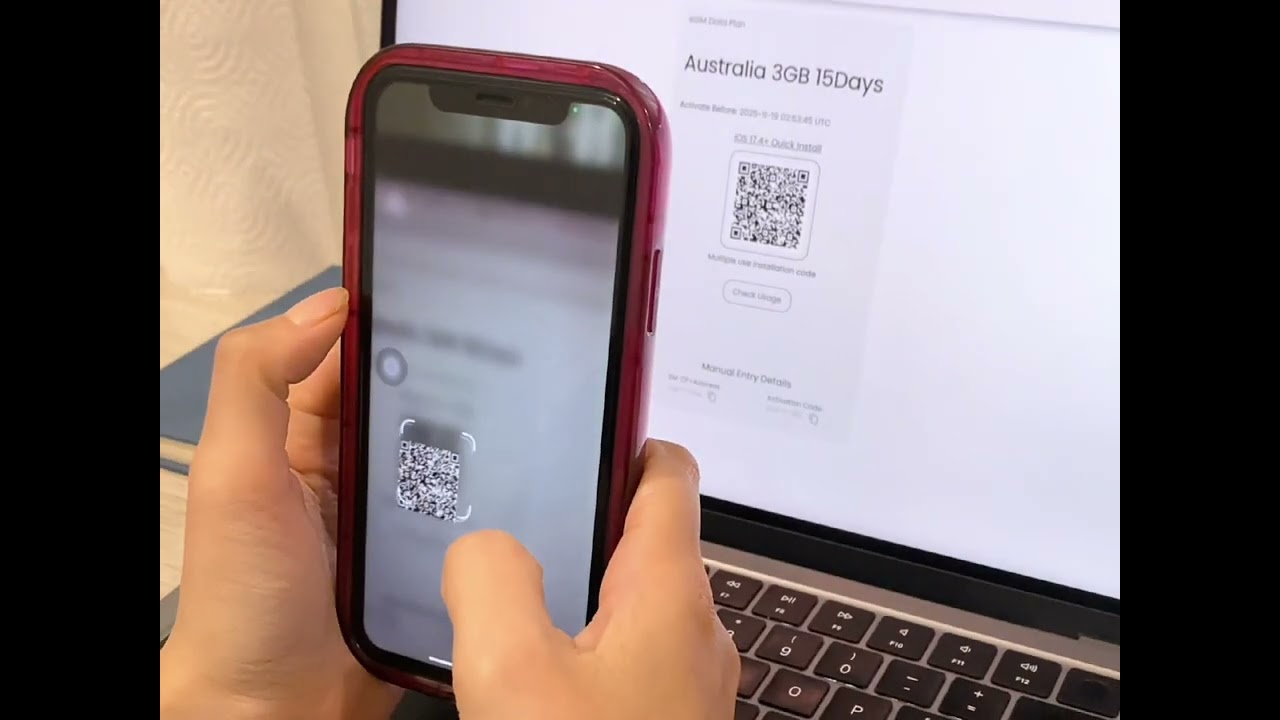
  • 目的地を選択し、データプランを選んで、チェックアウトを完了してください。QRコードがメールで即座に届きますので、それをスキャンして、物理的なSIMカードなしで簡単にeSIMを有効化できます!

    eSIMを探検する
  • さまざまな機会や目的地に合わせたデジタルギフトカードのセレクションからお選びください。

    ギフトカードを探す
eSIM How It Works Video
Click to play

How Does BitJoy's eSIM Work?

Getting connected with BitJoy is fast, easy, and hassle-free! Just follow these simple steps!
Device compatibility illustration
STEP 1

Check device compatibility

Make sure your phone supports eSIM. Most iPhones (XS or newer) and many Android devices do. Your phone must also be carrier-unlocked.
Purchase plan illustration
STEP 2

Choose and Purchase Your Plan

Select your eSIM plan and complete payment. You'll receive an email with your QR code and activation details instantly.
Install eSIM illustration
STEP 3

Install Your eSIM

QR Code (Recommended)

1
Open Settings → Cellular / Mobile Data → Add eSIM
2
Scan the QR code from your BitJoy email
3
Follow the setup prompts to complete installation

Manual Setup

1
Open Settings → Cellular / Mobile Data → Add eSIM
2
Choose "Enter Details Manually"
3
Enter the SM-DP+ address and activation code from your BitJoy email
Activate eSIM illustration
STEP 4

Activate Your eSIM

Your eSIM connects automatically. Before browsing, be sure to:
Check
Turn on Data Roaming
Check
Set eSIM as your Primary Data Line
Check
Keep SIM active for calls/SMS
Need help illustration
STEP 5

Need Help?

Chat
Live Chat: 24/7 support available
Help
Help Center: Step-by-step guides & troubleshooting
Video
Video Tutorials: Watch setup demos for your device

What our customers are saying

4.4/5.0
  • Video testimonial by Alex
  • 5 stars
    It activated quickly. I connected without any issues after receiving the QR code in a matter of minutes. The ability to pay with cryptocurrencies was also appreciated; the entire process went well. I had no trouble staying connected during my journey because of it. For hassle-free internet access, BitJoy is a great option if you're planning a trip soon!
    Carl Walker
    Location
    United States
    Closing quote
  • 5 stars
    The activation process is not complicated, and it was done quickly by following the steps. The payment method is also flexible. I tried credit card and cryptocurrency payment, and both were completed smoothly, and the payment was immediate. When I arrived at the local area, I scanned the code to connect to the Internet, which is very convenient and very suitable for travel.
    Larry Johnson
    Location
    United States
    Closing quote
  • 4 stars
    I'm giving 4 stars because the installation guide didn't mention that I had to set up the APN manually, and support also didn't immediately suggest it. I had to do some troubleshooting myself. Other than that, so far so good. P.S. I used it in Turkey and the APN is 'isp.'
    Dmitry Ungurean
    Location
    Netherlands
    Closing quote
  • 4 stars
    Activation is simple, and payment supports multiple methods, including cryptocurrency, and the operation is very smooth.
    Albert Hill
    Location
    United States
    Closing quote
  • 5 stars
    The experience is good, the whole process is smooth, and it is very user-friendly.
    Tony Robertson
    Location
    United States
    Closing quote
  • 5 stars
    I purchased data from BitJoy for my father. Data worked as promised by the team. My father didn't face any problem at Toronto airport.
    Rahul Sharma
    Location
    United Arab Emirates
    Closing quote